AI Image Prompts Gallery

Real prompts from real creations. Open any case to see the prompt that made it, the model that ran it, and how the image evolved.

These prompts come from published DREAMMMER conversations, not invented sample captions. Each card pairs a finished image or video with the prompt and model recorded for that result. Open a case to follow the wider conversation, then adapt the parts that matter for your own brief.
Create a high-resolution, sleek modern 3-page editorial food magazine spread presented as three equaView creation process

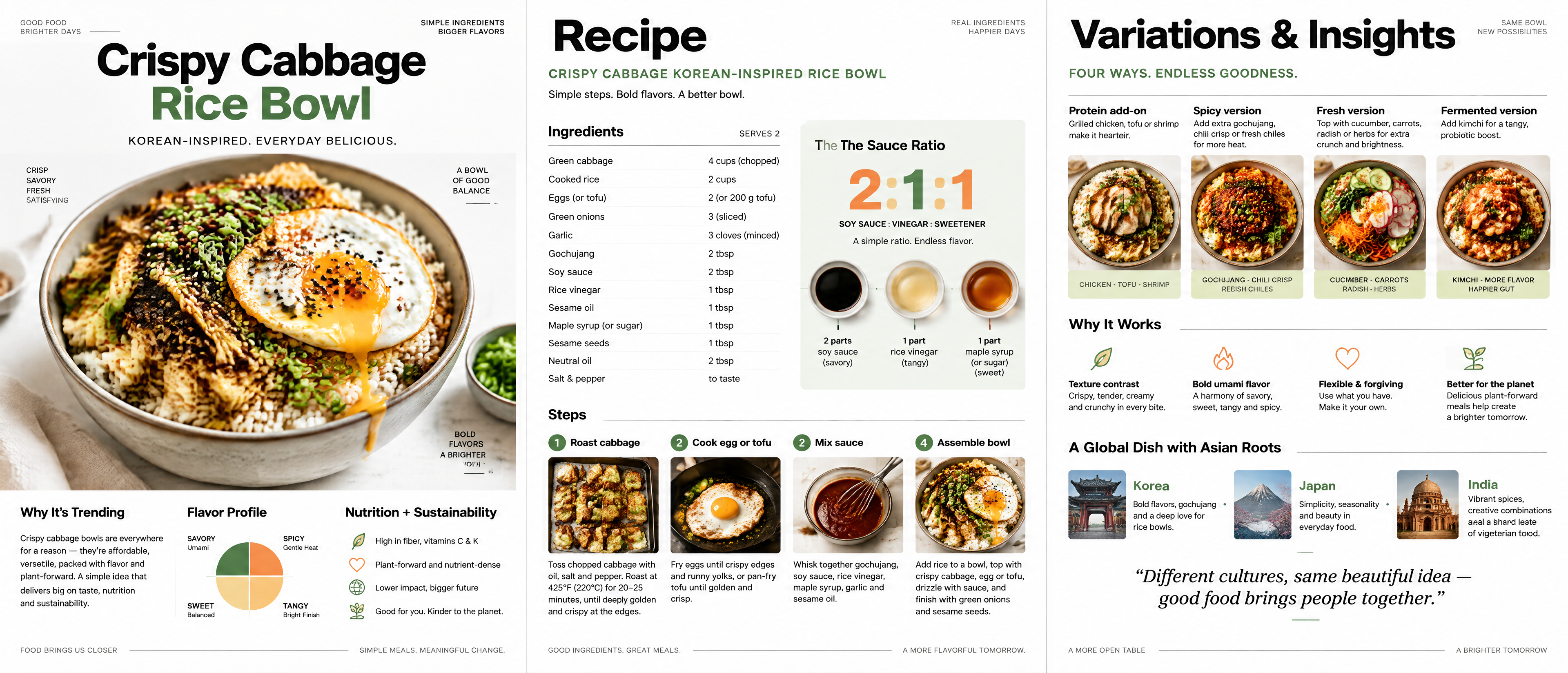
Create a high-resolution, sleek modern 3-page editorial food magazine spread presented as three equal vertical panels side-by-side in one wide horizontal composition. Theme: “Crispy Cabbage Korean-Inspired Rice Bowl.” Premium minimalist food magazine art direction, bright white background, generous negative space, strict Swiss-inspired grid, bold clean sans-serif typography, subtle accents in leafy green, warm orange, and black, soft restrained shadows, sharp photorealistic food photography mixed with elegant geometric diagrams and refined infographics. No scrapbook styling, no clutter. LEFT PANEL — PAGE 1: Large hero photograph of a beautiful ceramic rice bowl filled with fluffy rice, deeply caramelized crispy roasted cabbage, scallions, sesame, and a glossy fried egg with a golden runny yolk. Editorial title clearly readable: “Crispy Cabbage Rice Bowl”. Add a concise subtitle. Include clean text sections titled “Why It’s Trending”, “Flavor Profile”, and “Nutrition + Sustainability”; use short tasteful placeholder editorial copy, a minimal circular/quadrant flavor diagram, and tiny elegant sustainability/nutrition icons. CENTER PANEL — PAGE 2: Clearly readable title “Recipe”. Structured ingredient list in a neat column. Include four small numbered step images and labels: “1 Roast cabbage”, “2 Cook egg or tofu”, “3 Mix sauce”, “4 Assemble bowl”. Add thin rules, arrows, precise spacing, and a clean sauce-ratio infographic prominently reading “2:1:1”. RIGHT PANEL — PAGE 3: Clearly readable title “Variations & Insights”. Four orderly variation cards with miniature food photos and labels: “Protein add-on”, “Spicy version”, “Fresh version”, “Fermented version”. Include a concise “Why It Works” section with minimal line icons and short explanations. Add a refined cultural influence row labeled “Korea · Japan · India”. Finish with an elegant italic quote at the bottom. Keep all typography aligned, polished, legible, and magazine-authentic. Ensure the three panels feel like one cohesive professional editorial spread, with balanced image-to-text hierarchy and impeccable spacing.

Create a premium vertical 9:16 editorial poster in English titled “CUT SPACE”. Show a monumental bruView creation process

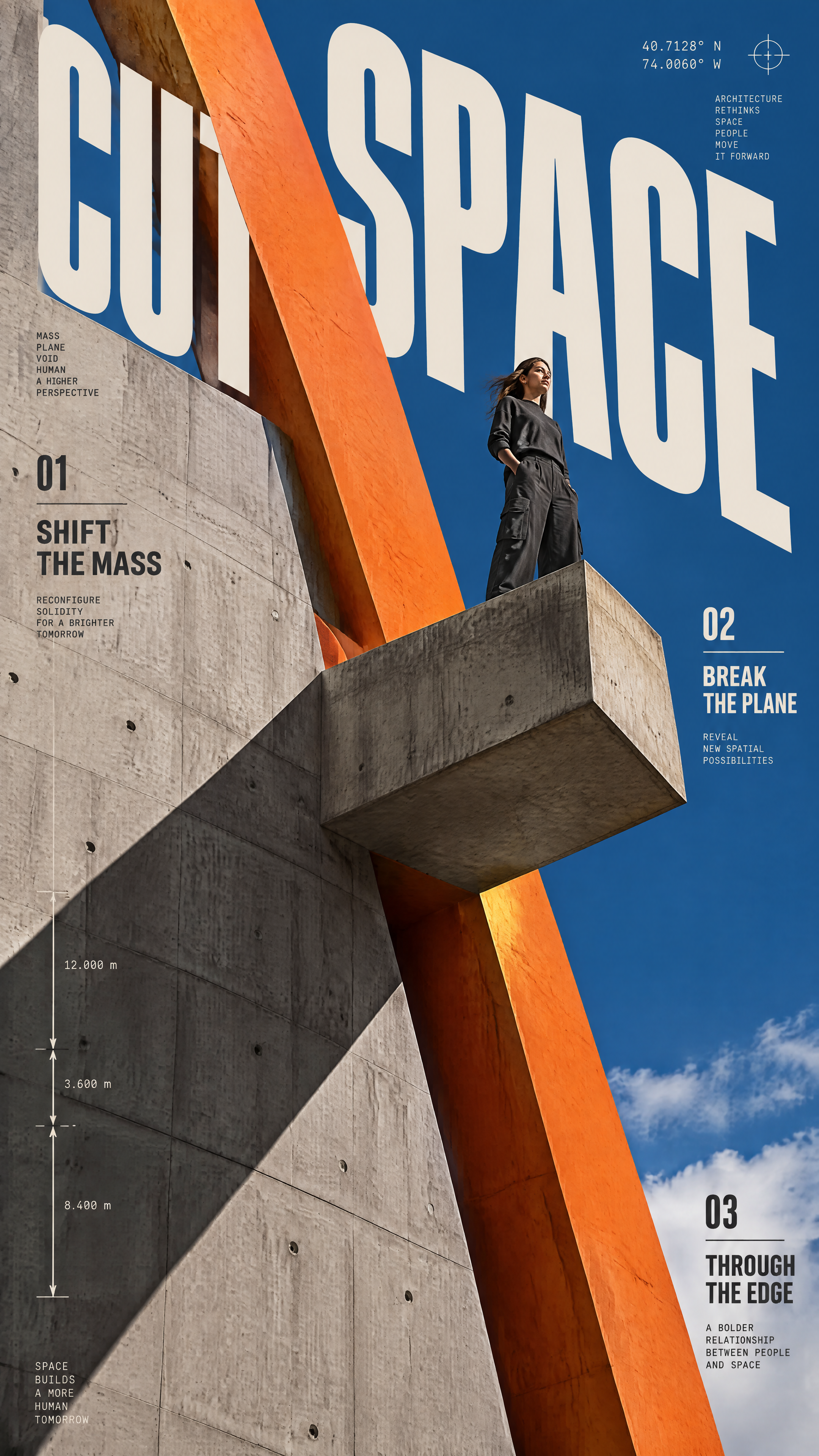
Create a premium vertical 9:16 editorial poster in English titled “CUT SPACE”. Show a monumental brutalist raw warm-gray concrete wall with a projecting platform, viewed from a dramatic low angle with powerful architectural perspective. Place a realistic young woman standing naturally near the outer edge of the platform, believable anatomy, skin texture, clothing folds, and charcoal clothing. Insert a thick diagonal safety-orange spatial slice cutting violently through the concrete architecture and through the typographic space, with dimensional thickness, sharp edges, and strong cast shadows. Use a deep cobalt-blue sky. Place the main title “CUT SPACE” in giant tall condensed warm-ivory letters across the sky, integrated into the perspective and partially interrupted or occluded by the orange slice. Add clearly legible secondary editorial text: “SHIFT THE MASS”, “BREAK THE PLANE”, and “THROUGH THE EDGE”, plus small architectural annotations, coordinates, measurement marks, and numbered details. Bold, structural, aggressive, sophisticated Swiss/brutalist graphic design; realistic architectural photography fused with precise 3D spatial graphics; strong negative space, hard sunlight, crisp shadows, subtle concrete grain, print-ready finish. Palette limited to warm-gray concrete, deep cobalt blue, warm ivory, charcoal, and safety orange. No extra people, no logos, no watermark, no clutter. Ensure all requested text is spelled correctly and legible.

View creation process

A single continuous 5-second vertical shot in the style of a traditional high-end 3D animated feature, blending anime stylization with believable realism. A young girl in a traditional East Asian-inspired outfit with twin hanging buns and wide sleeves stands against a clean pure-black background, framed in a medium shot with her entire upper-body movement visible. Use extreme cartoon squash-and-stretch and smooth keyframe animation. Include a short Japanese startled cry, such as “えっ、なに!?” with perfectly synchronized mouth movement; vocal delivery is sudden, loud, and astonished, with expressive timing matching the action. 0–2 seconds: She looks at something off-screen and suddenly reacts in shock, quickly stepping half a step backward. Her shoulders jerk upward, both hands fly to chest height with fingers spread wide, and her head tilts back. Her twin buns and wide sleeves swing with dynamic cloth and hair motion, leaving clear stylized motion trails. Her mouth opens slightly in surprise. 2–4 seconds: Escalate into an extreme cartoon explosion of surprise. Her eyes comically enlarge beyond normal proportions and stretch outward from her face, her eyebrows shoot upward and separate from the brow ridge, and her mouth opens into a huge O-shape while her cheeks tighten. A giant red exclamation mark bursts above her head, surrounded by fast impact lines, comic vibration marks, and energetic visual effects. The camera rapidly pushes in toward her face while she shouts, maintaining an intense exaggerated-surprise expression. 4–5 seconds: The exaggerated effects quickly dissolve. Her oversized eyes contract smoothly back to normal, her body settles, she blinks and rubs one eye with her hand. She lowers her head slightly, furrows her brows, and shifts into a skeptical, mildly exasperated expression before returning to normal conversation. The camera slowly pulls back to the original medium framing. Strong readable poses, powerful timing, smooth transitions, high-resolution detail, cinematic lighting on the character against the black background, polished cloth dynamics and hair motion, no cuts, no subtitles, no on-screen text except the red comic exclamation mark.

Create one standalone premium editorial poster from the supplied photograph, vertical 3:4. Do not crView creation process

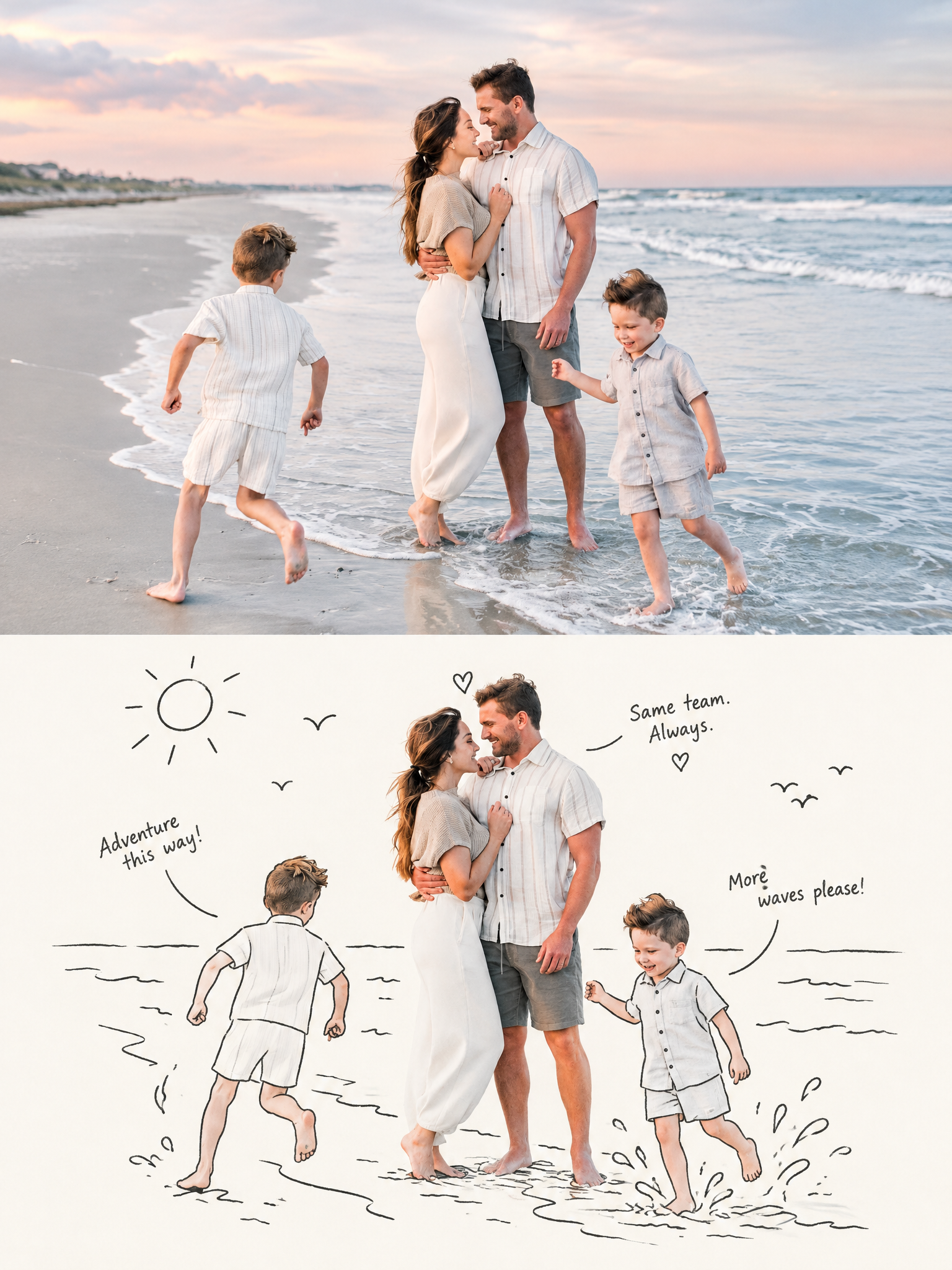
Create one standalone premium editorial poster from the supplied photograph, vertical 3:4. Do not create a collage of multiple photos. Divide the canvas into two equal-height sections with a precise horizontal 50/50 split. UPPER HALF: preserve the original photograph's main subject, composition, recognizable structure, realistic material texture, natural light and shadow, and original color atmosphere. Apply restrained high-end photographic color grading inspired by lifestyle magazines, independent publications, and fine-art photography. If needed, naturally extend the surrounding environment to fit the vertical format, but never stretch, distort, or alter the main subject. Make the upper half feel like a beautifully printed photographic plate. LOWER HALF: understand the photograph's true visual core, memorable emotion, action, relationship, contrast, spatial rhythm, and narrative—not merely the most obvious object. Reimagine that core as an editorial illustration built around the real subject and several simple black-line doodle figures. Keep the most meaningful real subject or visual anchor, with its identity, material qualities, and key proportions recognizable. Do not mechanically crop the largest object. Preserve essential relationships and poses while simplifying irrelevant details. Use several thin black or dark-gray line doodle figures whose gestures and interactions naturally respond to, amplify, or playfully subvert the original scene. Use a clean off-white or very pale background with generous negative space. Pull the lower-half palette from the most distinctive vivid colors in the upper photograph, purifying and brightening them; the realistic subject carries the color while doodles and text use delicate black/dark-gray lines. The overall design is bright, restrained, intelligent, and premium. Add a few ultra-short, witty, lighthearted editorial phrases derived from the image's emotional meaning and visual relationships, not literal object labels. Text should feel like notes from the doodle figures, fleeting thoughts, or off-screen commentary, with subtle humor or wordplay. Integrate it organically along contours, gestures, and empty-space rhythm rather than placing a rigid headline. Ensure all text is clean, legible, minimal, and aesthetically typeset. No borders, no watermark, no extra photo panels, no arbitrary doodles, no distortion of the original subject.

Create a strictly vertical 9:16 composite poster divided into two equal-height horizontal panels, wiView creation process

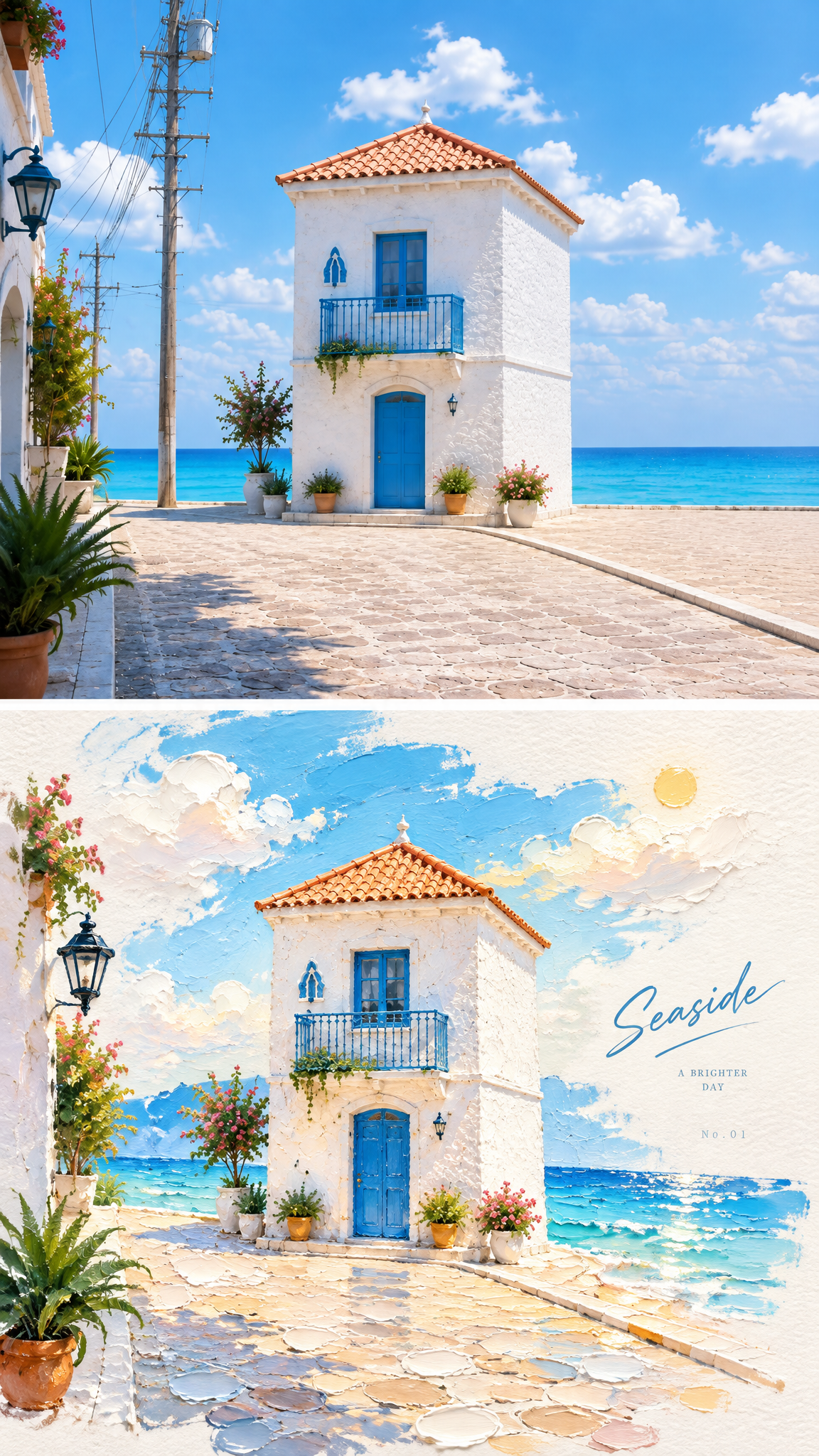
Create a strictly vertical 9:16 composite poster divided into two equal-height horizontal panels, with an exact 1:1 top-to-bottom ratio and a clean, clear separation. Use the uploaded image as the sole visual reference. TOP PANEL — ORIGINAL PHOTO: Reproduce the uploaded original photograph directly and faithfully. Preserve the main subjects' facial features, fur or hair colors, poses, movement, clothing, accessories, expressions, temperament, and realistic photographic texture. Keep the original natural lighting and atmosphere. Background architecture, streets, furniture, and surroundings remain secondary and may be gently softened. Do not stylize this upper panel. It must read clearly as the original photo before translation. BOTTOM PANEL — STYLE TRANSLATION: Recreate the same recognizable main subjects and their narrative relationship as a tactile 3D impasto oil-painting miniature landscape illustration poster. Preserve identity and key features while allowing moderate artistic adjustment of angle and proportions. The main subjects must remain dominant; buildings and environment must never become the protagonist. Use thick piled brushstrokes, layered vivid pigments, sculptural volume, palette-knife marks, undulating painted edges, bright textured paper, and a semi-hand-sculpted miniature physical-model feeling. Compose the lower panel with abundant warm-white negative space and a centered or slightly off-center diagonal axis. Place a translucent impasto color strip matching the original scene beneath or around the subjects, like water, ground, a path, a ribbon of light, or a landscape slice. Add subtle reflections, ripples, and luminous spots where appropriate. Include only sparse impasto clouds, a small sun, and soft mist in the background. Use a bright, refined palette inspired by the original but lifted in brightness and purity: crisp sky blue, lake cyan, tender green, warm yellow, coral orange, peach pink, golden yellow, and pure warm white. Avoid muddy colors, aged tones, muted Morandi colors, dark brown, neon glow, candy colors, plastic rendering, cartoon toy aesthetics, e-commerce styling, and template-like design. Concentrate impasto texture on water, clouds, color strips, and highlights. Add only minimal restrained typography in the lower panel: a very short title derived from the subject's mood or identity, plus tiny subtext or numbering, placed subtly along the diagonal axis or in open space. No watermark, logo, lengthy explanatory text, or unrelated subjects. The bottom panel must be instantly recognizable as a poetic stylized re-creation of the exact same image above.

How to use these AI image prompts

Start with the subject and outcome

Read the opening of a prompt to find its central subject and the kind of finished image it asks for. A product photograph, character sheet and editorial poster may use similar tools, but they solve different problems. Keep the part that matches your goal and replace details that belong only to the original creator's brief. If a prompt describes a particular person, product or campaign, use your own subject and approved reference material. That change makes the example useful without trying to reproduce somebody else's exact image.

Find the instructions that shape the picture

Look next for composition, lighting, color, materials, camera angle and any text that must appear in the frame. These details often matter more than a long list of style adjectives. A request for a neutral background and soft side light will produce a different result from a crowded scene with hard flash, even when the subject is identical. Notice which instructions are essential and which are optional. When you write your version, put the essential visual constraints in plain language and remove conflicting directions before adding more detail.

Check references, model and settings

Some examples begin with a supplied photograph; others start with text. If the prompt says to preserve a face, garment, room layout or product shape, the original result depended on a reference image as well as the words. Bring a suitable image of your own when you try that approach. The model link on each card identifies the image model used for the selected result. Open the case to see how the conversation continued. Aspect ratio and resolution can affect framing and detail, so choose settings that suit your target format rather than assuming the original setup is always best.

Adapt one decision at a time

Copying an entire prompt can be a useful first experiment, but a smaller edit teaches you more. Change the subject while keeping the lighting, or keep the subject and change the setting. For a poster, replace the headline and required wording before you adjust decorative effects. For a portrait, decide which features must stay consistent across versions. Keep a short note of the change you made and compare the new image with the previous one. This makes it easier to tell which instruction actually improved the result and which merely made the prompt longer.

Use the result as feedback

A prompt is a starting point, not a guarantee of an identical output. After generating, inspect the image for missing text, altered product details, awkward anatomy or a composition that does not fit your use. Describe the specific correction you want, and say what should remain unchanged. If the model repeatedly misses a requirement, simplify the request or separate it into stages: establish the main scene first, then refine a smaller detail. The public cases show that useful images often come from a sequence of clear decisions rather than one perfect sentence.

FAQ

Are these AI image prompts free to use?

You can browse the public examples and read their prompts without paying. Creating a new image in DREAMMMER requires signing in and uses credits according to the model and settings you choose. Use your own references and check that you have the right to use any people, products or brand material in them.

Which model made each image?

The model name beneath each image links to its model page. It comes from the successful generation record for that specific selected image, rather than a guess based on appearance. You can try another model, but expect differences in composition, text rendering and how closely it follows a reference.

Can I copy a prompt and change it?

Yes. Open the public case to read the prompt in context, then copy the useful parts into your own request. Replace the subject, required text, references and format with your own details. Make one change at a time if you want to learn which instruction affects the result.

Do I need the same reference image?

No. Some prompts depend on an uploaded image, but the original reference is not required to learn from the example. Supply a photo you are allowed to use and describe which parts should be preserved or changed. A different reference may lead to a very different result, even with similar wording.