A launch article shows the model at its best. A useful review should show what happens when the prompt, settings, and first output are fixed in advance.
This page does not copy the official post or reuse its examples as proof. It summarizes the official claims, states the limits of Dreammmer's current interface, and records four original first outputs with visible strengths and failures.
Four claims worth testing
The official Seedream 5.0 Pro release groups the model's improvements into four practical areas. We use those areas as hypotheses, not conclusions.
Dense information layouts
The model is presented as able to organize text, diagrams, and data into professional infographic layouts.
Precise, guided editing
The announcement covers spatial guidance, regional edits, sketches, layer separation, and multi-image fusion.
Materials and portrait texture
Lighting, reflections, refraction, skin texture, and photographic realism are central parts of the visual-quality claim.
Multilingual generation
The model is presented as understanding prompts and rendering text across more than ten commonly used languages.
The model can do more than this interface exposes
The official article describes the full model capability set. Dreammmer currently provides a narrower generation workflow, so this review only tests actions a visitor can actually perform here.
Available in Dreammmer now
- Text-to-image with Seedream 5.0 Pro.
- One optional JPG or PNG reference image per request.
- Supported aspect ratios, one to four outputs, and Pro resolutions up to 2K.
- Moderation, credit tracking, generation history, preview, and download.
Not exposed as Dreammmer tools
- No point, lasso, brush, or in-page annotation canvas.
- No editable layer-separation export.
- No multi-reference-image input in one request.
One prompt, one attempt, one result
Each case uses Seedream 5.0 Pro at 2K with one output and no post-processing. Three cases start from text; the editing case uses one user-owned reference image.
We judge the first returned image. A production tool should not need twenty hidden attempts before it looks reliable, so there is no cherry-picking in this first pass.
The 4 images we tested
Each image below is the first output from the fixed prompt and settings shown beside it. No prompt repair, rerun, or post-processing was used.
Can it build a clean infographic without inventing copy?
This prompt fixes every required line, the order, and the visual hierarchy. The result should be judged on exact text and layout, not just whether it looks polished at a glance.
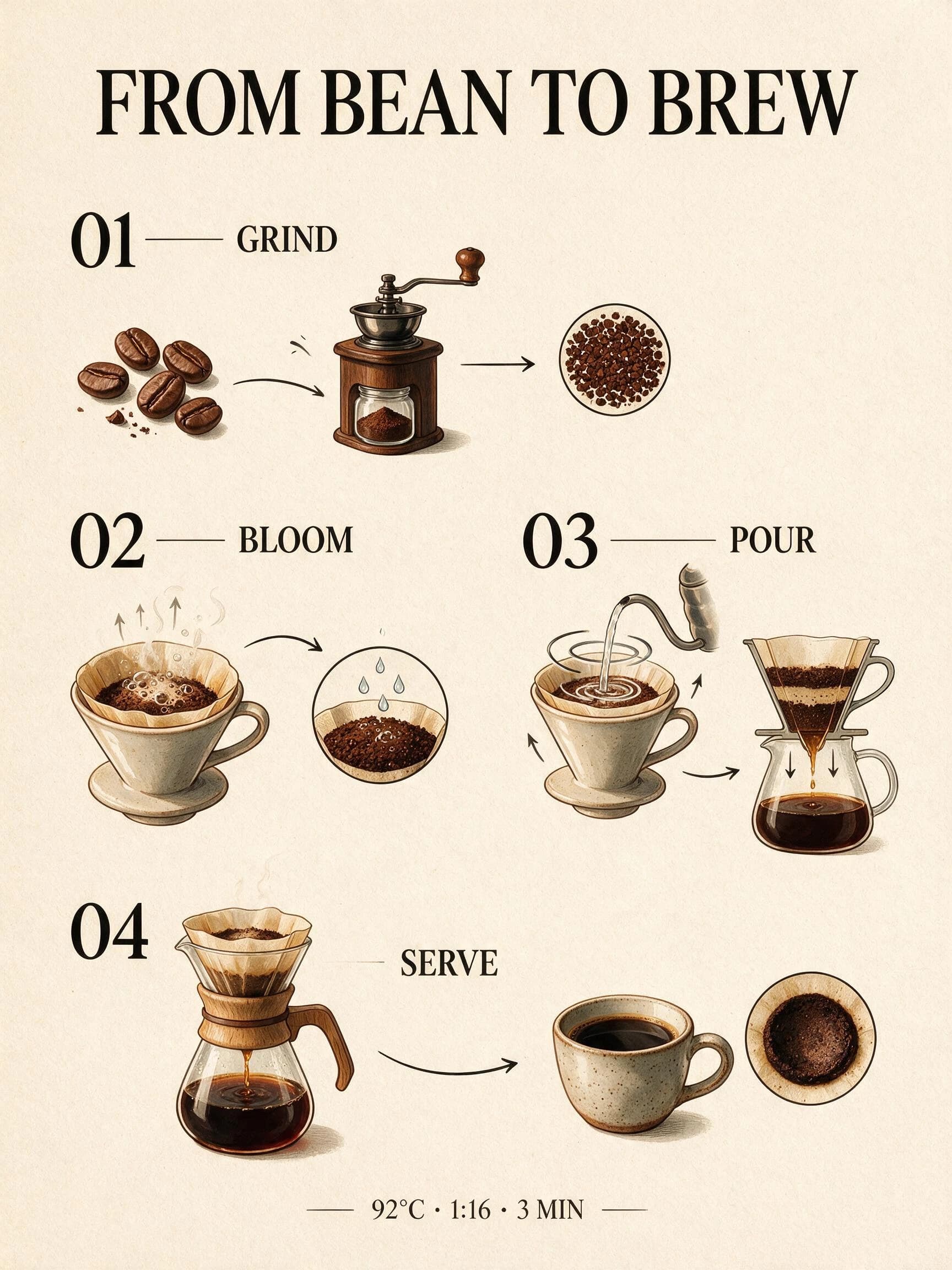
Design a vertical editorial infographic titled "FROM BEAN TO BREW". Use exactly four numbered sections: "01 GRIND", "02 BLOOM", "03 POUR", "04 SERVE". Add one footer line: "92°C · 1:16 · 3 MIN". Warm ivory paper, cobalt blue diagrams, black serif typography, clear spacing, no extra words, no logos, no watermark.
Test setup
No reference image. Select Seedream 5.0 Pro, 2K, 3:4, and one output.
Scoring criteria
- All required headings and the footer line are spelled correctly.
- The four numbered steps read in the requested order.
- No extra pseudo-text, logo, or watermark appears.
- The hierarchy still works when the image is viewed at article width.
Exact copy and strong hierarchy, but the requested color was missed.
Pro preserves the title, four numbered steps, order, and footer exactly. The editorial flow and illustrations are well developed, but the diagrams are brown and black rather than the requested cobalt blue.
Do glass, metal, liquid, and stone behave like different materials?
A perfume bottle puts several difficult surfaces next to each other. The image needs believable refraction, contact shadows, and small imperfections without turning into a sterile 3D render.
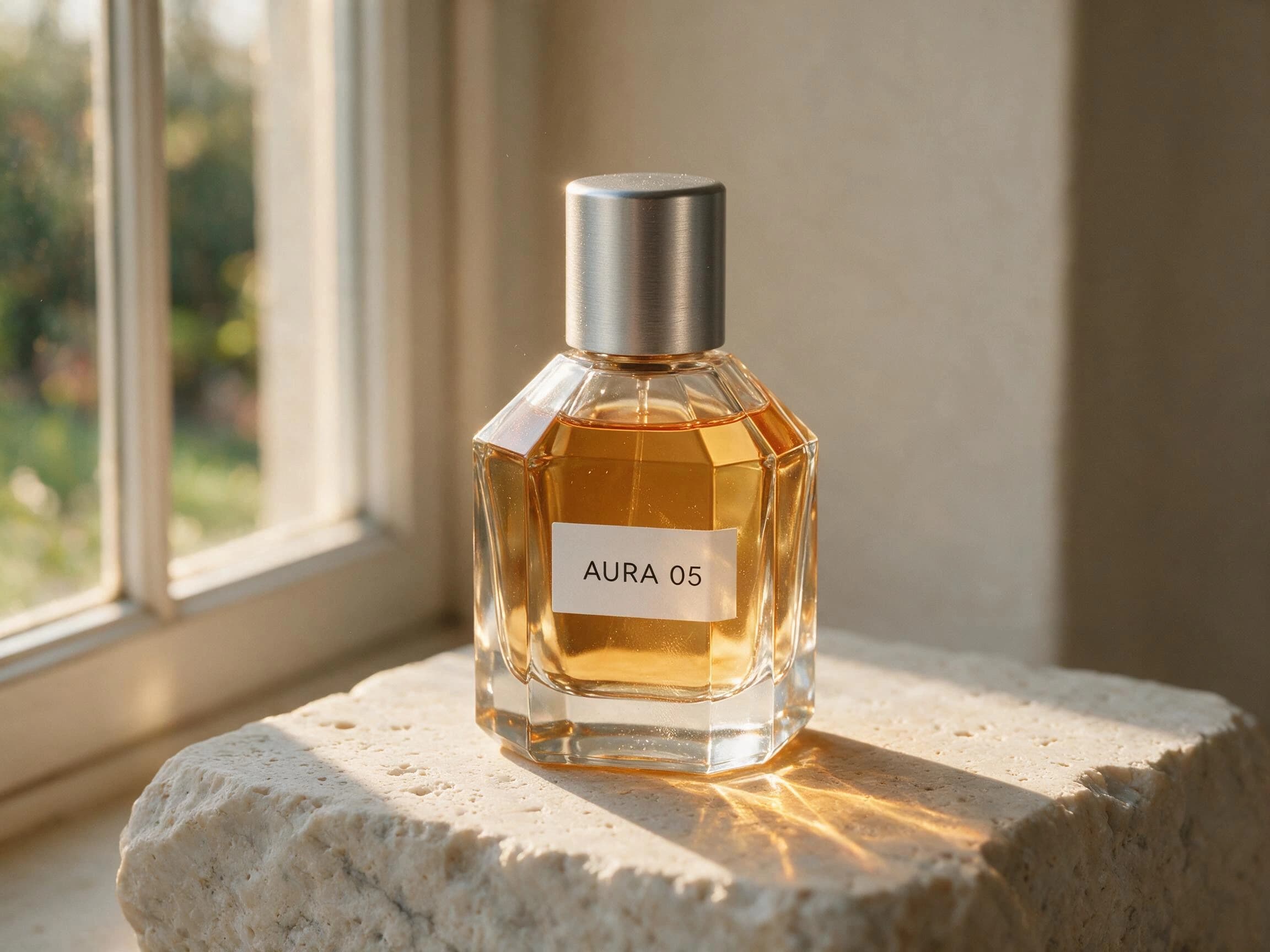
Create a premium studio product photograph of an original unbranded perfume bottle labeled exactly "AURA 05". Clear faceted glass, amber liquid, brushed aluminum cap, placed on pale travertine. Late afternoon side light through a narrow window, realistic caustics, refraction, contact shadow, subtle dust and fingerprints, restrained editorial composition, no additional text, no logo, no watermark.
Test setup
No reference image. Select Seedream 5.0 Pro, 2K, 4:3, and one output.
Scoring criteria
- The label reads AURA 05 without added brand copy.
- Glass, amber liquid, aluminum, and stone remain visually distinct.
- Reflections, caustics, and the contact shadow agree with the light direction.
- The bottle rests on the surface instead of floating.
The material study passes the core brief.
The AURA 05 label is exact, the materials separate cleanly, and the side light produces coherent caustics and contact shadow. The restrained framing feels ready for an editorial product layout.
Can one poster keep five scripts legible at the same time?
This is a transcription test before it is a style test. English, Chinese, Spanish, Japanese, and Arabic must all survive the same editorial layout without substitutions or decorative gibberish.
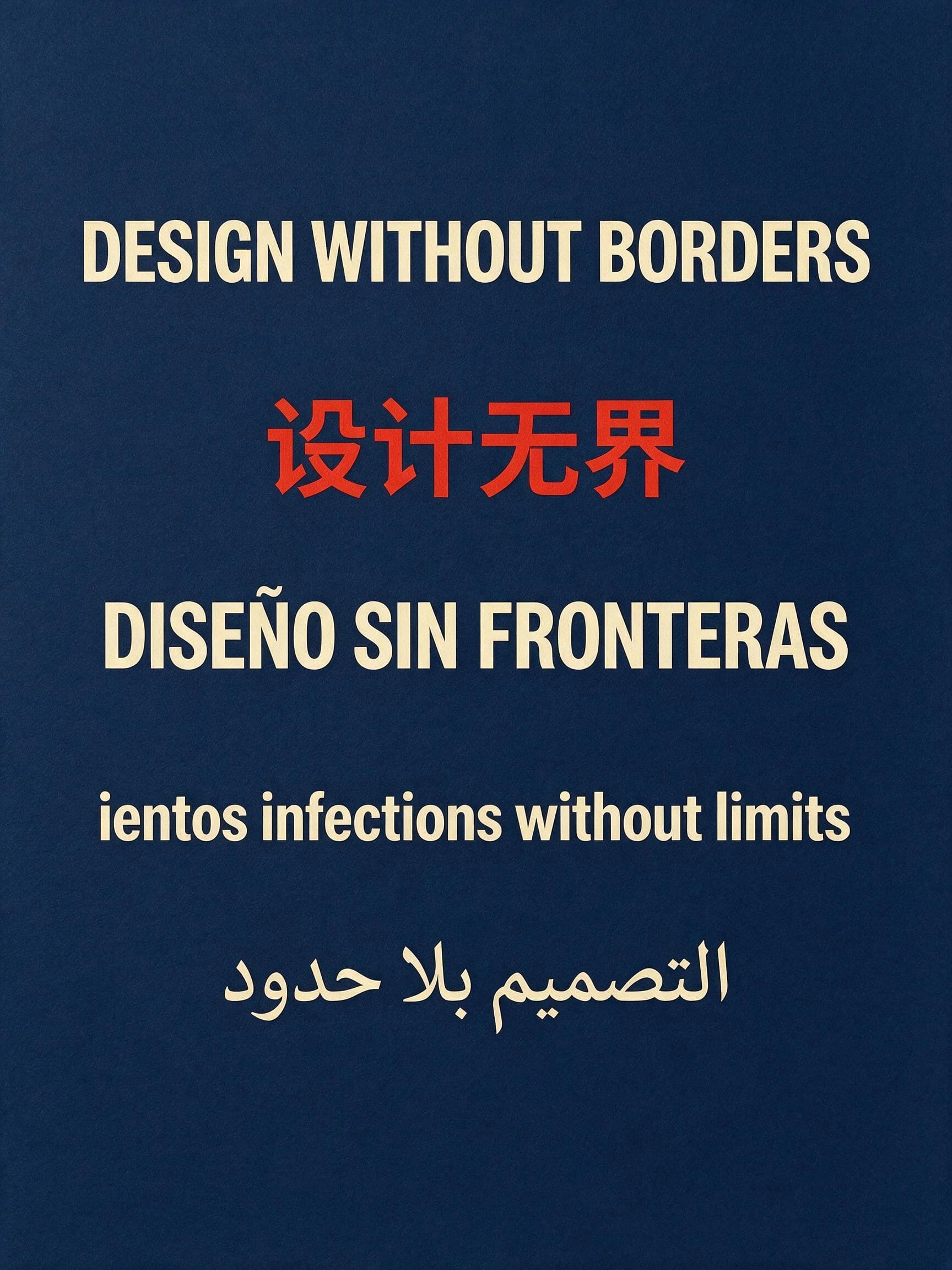
Create a vertical typographic poster on deep navy paper. Set these five lines exactly as written, each once, with generous spacing: "DESIGN WITHOUT BORDERS", "设计无界", "DISEÑO SIN FRONTERAS", "デザインに境界はない", "التصميم بلا حدود". Use cream and vermilion ink, modern editorial grid, keep every character legible, no extra words, no logo, no watermark.
Test setup
No reference image. Select Seedream 5.0 Pro, 2K, 3:4, and one output.
Scoring criteria
- Each of the five supplied lines appears exactly once.
- Spanish accents and Japanese characters remain intact.
- Arabic connects and reads from right to left correctly.
- No extra letters or invented supporting copy appear.
The poster is not safe for production typography.
English, Chinese, Spanish, and Arabic remain legible, but the Japanese line is missing and replaced by garbled Latin copy. A polished layout does not compensate for failed transcription.
Can it change the set without quietly redesigning the product?
Dreammmer accepts one reference image, not the full point-and-lasso workflow shown in the model announcement. This case tests whether a plain-language keep/change instruction is enough.
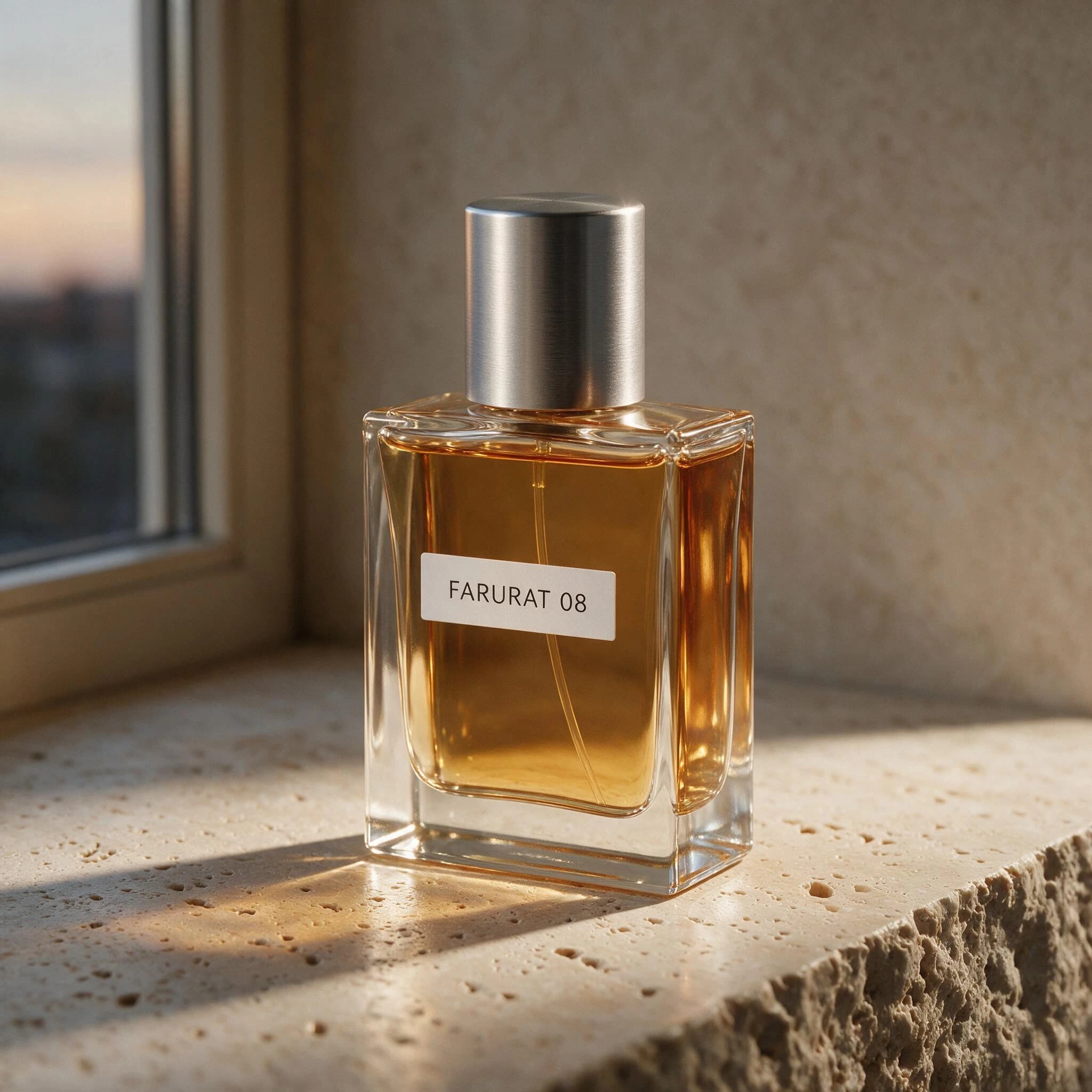
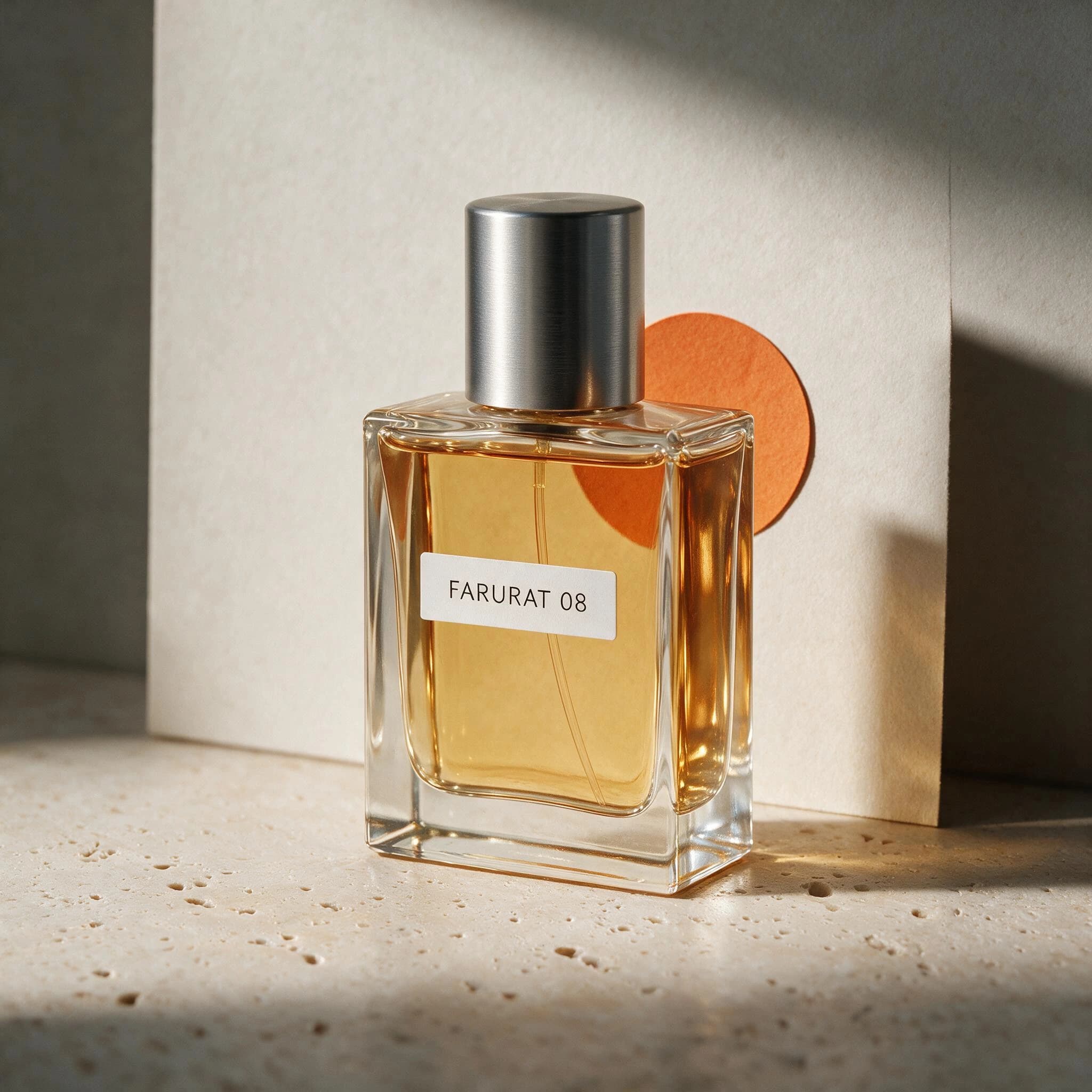
Preserve the product's exact silhouette, proportions, label placement, and primary color from the reference image. Replace only the background with a quiet cobalt-blue studio set, add a small warm orange paper circle behind the product, and change the lighting to soft left-side window light. Keep the camera angle and product position unchanged. Do not add objects, text, logos, or watermark.
Test setup
Upload one square product photo that you own and that has no third-party trademark. Select Pro, 2K, 1:1, and one output.
Scoring criteria
- Silhouette, proportions, label placement, color, camera angle, and position stay close to the source.
- Only the background, paper circle, and lighting change as requested.
- The edit does not add props, text, or a new logo.
- Product edges and shadows remain coherent after the background change.
Product identity holds, but the requested blue set is missing.
The bottle scale, position, FARURAT 08 label, silhouette, amber liquid, and metal cap stay close to the source. The orange circle appears, but the background remains neutral instead of cobalt blue.
One pass, two mixed results, and one fail.
Pro showed its strongest advantage in visual hierarchy and material finish. Exact instruction following was less reliable when the brief required a specific palette or five-script transcription.
The useful conclusion is task-specific.
Seedream 5.0 Pro is a strong choice when layout and photographic finish matter, but production text and precise edit instructions still need human review. This four-case first-output review does not measure portrait consistency, speed, or repeatability.
Run the same four tests in Dreammmer
Keep the model, resolution, ratio, and prompt unchanged. That makes the results comparable and gives this review evidence that another reader can reproduce.
Use these Pro results in a matched model comparison with four Lite outputs.
See the exact one-reference-image workflow that Dreammmer currently supports.
Use fifteen production-oriented prompts for ecommerce and campaign images.