Pick Pavo AI if you want to
- Make a short drama or a series with the same characters across scenes
- Start from ready-made templates and Skills
- Create mostly on your phone, in an app
 DREAMMMER
Pavo AI alternative
Like Pavo AI, DREAMMMER turns a photo and one sentence into a short AI video. There is nothing to install, and the price is in the box before you send: 24 credits at 480p or 48 at 720p for 6 seconds (about $1.08). Failed runs give the credits back.
DREAMMMER is an independent product and is not affiliated with Pavo AI. Facts about Pavo AI on this page were checked on Oct 30, 2026.
Each clip below was made on DREAMMMER from the photo next to it and the words under it. Nothing was retouched afterwards.

Photo
Clip
Create a luxury perfume film from this coastal reference. Keep the blue AURA bottle, cap, label, stone and distant sea arch consistent. Let gentle waves sparkle behind it while the camera makes a slow precise push toward the bottle. Realistic sun glints on the glass, soft ocean ambience, no speech, no text or cuts.
Photo
Clip
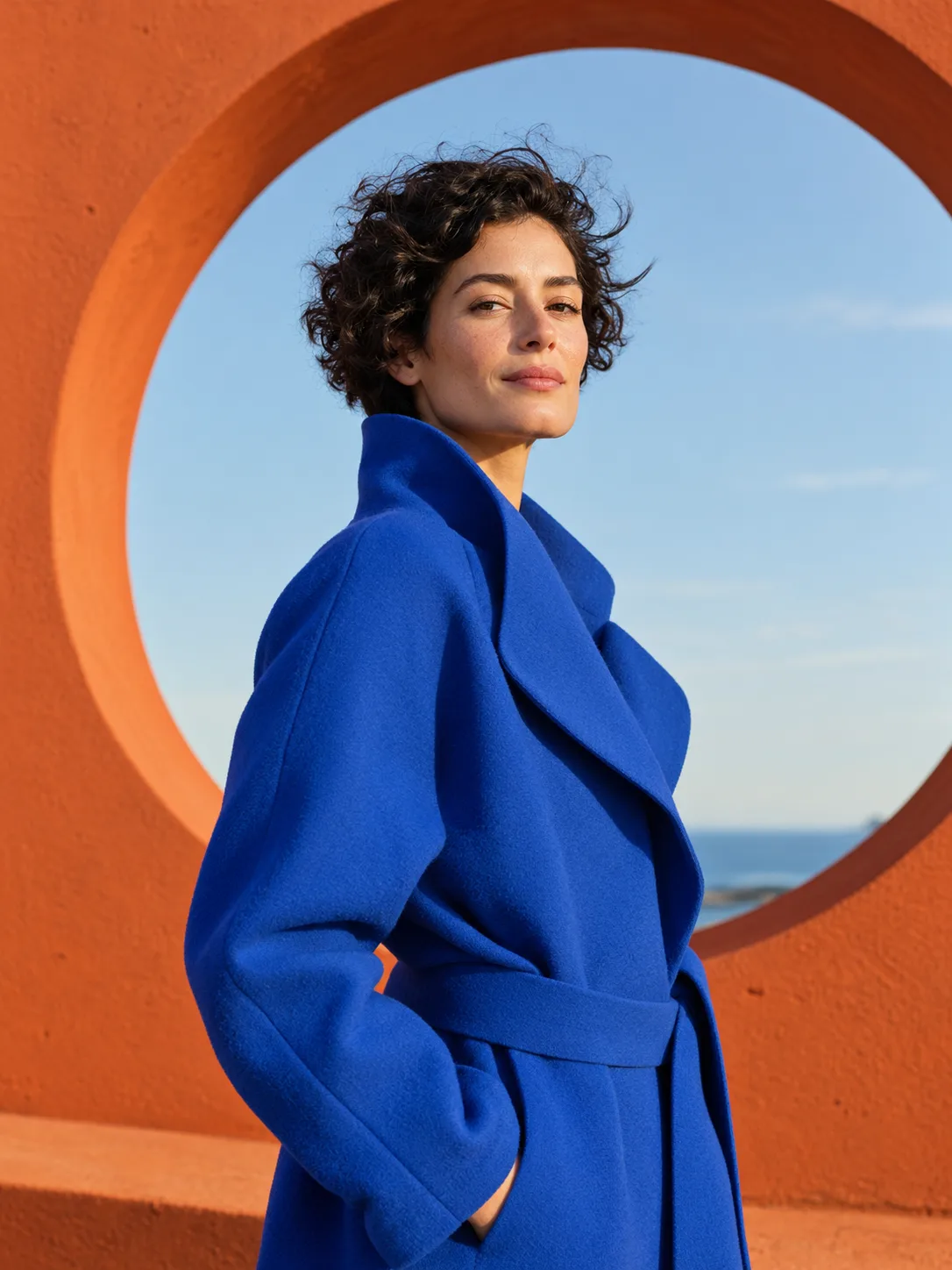
Animate the supplied fashion portrait naturally. The adult woman turns her head slightly toward the camera, her curly hair moves in a gentle breeze and the blue coat fabric shifts subtly. Keep her identity, outfit, orange circular architecture and camera framing consistent. Refined editorial film, soft outdoor ambience, no speech or text.

Photo
Clip
Slowly orbit this miniature moon garden in its ceramic cup. The tiny astronaut gently tends one flower, leaves move almost imperceptibly, and warm dust motes drift in the light. Preserve the cup, miniature scale, plants and overall handcrafted style. Soft atmospheric music and tiny gardening sounds, a graceful coherent camera move, no added text.
What each one offers for the same job: making images and short videos from your own photos and words.
| Feature | Pavo AI | DREAMMMER |
|---|---|---|
| Where it runs | Web app at app.pavo-ai.work, plus Android and iOS apps | In the browser on a computer or phone, nothing to install |
| Built around | Short dramas, template videos, an infinite canvas and 100+ Skills | Single photos, images and short clips that you make and keep editing in one chat |
| How you start | A prompt box where you tag uploaded images and videos with @ | One box with three modes: Agent plans the job for you, Image and Video run exactly what you typed |
| Video models | Its own Agnes Video 2.5 Flash (marked free) and Agnes Video 2.5, plus Seedance 2.5 and Wan 3.0 for members | GROK Video 1.5, Seedance 2.0 Mini, MiniMax H3, Kling 3.0, Kling 3.0 Turbo, Seedance 2.5 and Veo 3.1 Quality |
| Price before you generate | Plan prices appear after you sign in | Shown in the box before you send: 48 credits for a 6-second 720p clip on GROK Video 1.5 |
| Buying credits | Not listed on its public pages | Credit packs from $9 for 400 credits, or a monthly plan |
| If a generation fails | Not stated on its public pages | The credits come back automatically |
| Cancelling a plan | Not stated on its public pages | Settings, Billing, Cancel subscription, at any time; the plan lasts to the end of the paid period |
Pavo AI details come from its web app, its Google Play listing and its app store description, checked Oct 30, 2026. Plans and prices change, so check its site before you pay.
Pavo AI is an AI image and video app from Singapore Sapiens Technology Pte. Ltd. It runs on the web at app.pavo-ai.work (app.pavo-ai.cn in mainland China) and as Pavo - AI Image & Video Maker on Android and iOS, where Google Play lists more than 500K downloads and a 3.2 rating.
You type what you want or upload references, tag images and videos with @, and generate with its own Agnes Video models or partner models such as Seedance and Wan. Its home page leads with short dramas, an infinite canvas, a library of 100+ Skills such as fashion model shots and felt-style animation, and a feed of community videos.
Several websites use the Pavo AI name, and some of them show their own prices. Before you sign in or pay, check that the address in your browser is the one you meant to open.
Every tool below runs in the browser and can turn a photo into a short clip. Plans are the monthly prices on each official pricing page. Credits are not comparable from one tool to the next.
| Tool | Free to start | Paid from | Best for |
|---|---|---|---|
| DREAMMMER | Free credits when you sign up, no card | Credit packs from $9 for 400 credits, no subscription needed | One photo or image at a time, with the price shown before you send and the result open in a chat for more edits |
| Runway | 125 one-time credits | $15 a month for 625 credits | Creative control and editing tools for people who make video often |
| Kling AI | Free Basic plan | $10 a month for 660 credits ($6.99 for the first month); paid plans remove the watermark and add 1080p and 4K | Realistic people and natural motion |
| Luma | No free plan listed | $30 a month for 10,000 credits | Cinematic camera moves, with Luma's own and third-party video models in one place |
| Pika | Free account; credits come in packs from $25 | $10 a month for 900 credits | Quick social clips and effects, with no watermark on any plan |
Checked on Oct 30, 2026 on runway.com/pricing, the Kling AI membership page, lumalabs.ai/pricing and pika.art/pricing, with monthly billing. Plans change often, so check before you pay.
Switch the box to Agent and describe the result in plain words. The Agent picks the model, length and format, asks if something is missing, and for videos and bigger jobs shows the plan with its credit cost and waits for your OK. Whichever mode you start in, the result opens in a chat where the Agent keeps editing it with you.
For example: “Make a 10-second vertical clip of my coffee shop photo for Instagram, with steam rising from the cup and a slow push in.”
Back to the boxPavo AI is an AI image and video app from Singapore Sapiens Technology. It makes images, text-to-video and image-to-video clips, and short dramas, on the web at app.pavo-ai.work and in its Android and iOS apps.
Pavo AI marks one of its video models, Agnes Video 2.5 Flash, as free in its model menu. Its other models are for members, and its plan prices appear after you sign in. On DREAMMMER, new accounts start with free credits and no card, and every run shows its price before you send it.
Pavo AI is a real product from a registered Singapore company, with more than 500K downloads on Google Play. Its rating there is 3.2, and recent low reviews mention renewal charges people did not expect and slow generation. Its Google Play data safety section, written by the developer, says the app collects no data, shares none with third parties, encrypts data in transit and lets you ask for deletion. With any AI subscription, note the renewal date and where to cancel before you pay, and check the website address, because several sites use the Pavo AI name.
The web app most people mean is app.pavo-ai.work, and in mainland China it is app.pavo-ai.cn. The phone apps are listed as Pavo - AI Image & Video Maker. DREAMMMER, the site you are on now, is a separate product.
No. DREAMMMER is an independent AI image and video editor with no connection to Pavo AI. This page compares the two so you can pick the one that fits your project.
Yes. Upload a photo in the box at the top of this page, write how it should move, such as a slow smile and a turn of the head, and send. A 6-second clip is usually ready in a minute or two and opens in a chat where you can ask for changes.
A 6-second clip on GROK Video 1.5 costs 24 credits at 480p or 48 credits at 720p. Longer clips and other models such as Kling, Seedance and Veo cost more, and the box shows the exact number before you send. Credits start at $9 for 400, so a 720p clip is about $1.08.
No. The box opens in Video mode on GROK Video 1.5 so the price is clear from the start. Switch to Agent and it chooses the model and settings from what you describe, and asks before it spends credits on videos and larger jobs.
If a generation fails, its credits go back to your account automatically. If it finishes but the motion is not what you wanted, that run is charged, so try again with a simpler or more specific description.
Open Settings, then Billing, and choose Cancel subscription. You keep the plan until the end of the period you paid for, and credit packs never renew.
It depends on what free means to you. Runway gives 125 one-time credits, Kling AI has a free Basic plan, and Pika lets you open a free account but sells credits in packs. On DREAMMMER, new accounts get free credits with no card, enough to try a few images, and a video starts at 24 credits with the price shown before you send it.
Last updated: · What's new