Professional headshots
Turn a casual snapshot into a photo in a suit or blazer for LinkedIn, a résumé or a company page.
 DREAMMMER
AI photo tool
Upload a photo and type the outfit in plain words. The AI redraws the clothing while keeping the face, hair, body, pose and background as close to the original as it can.
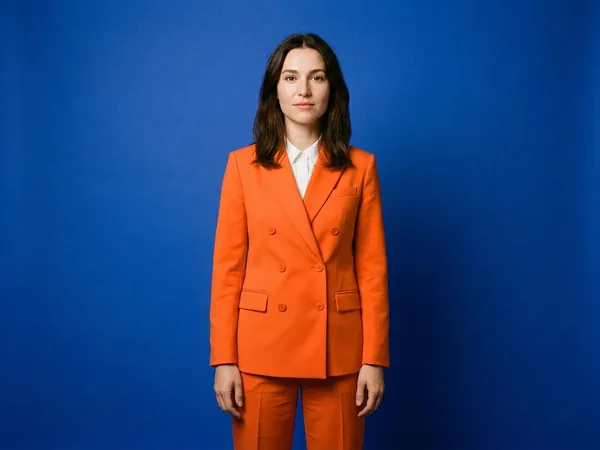
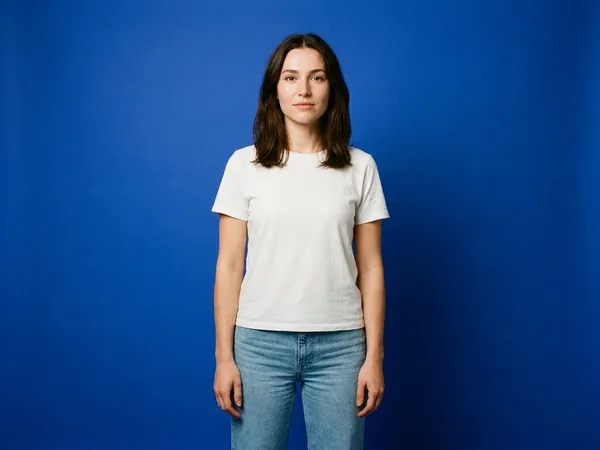
Drag the handle to compare the original with the result.
Drag a JPEG, PNG or WebP into the tool, or try the built-in sample first.
There is at most one option to pick. No prompt to write, no settings to learn.
The result lands in a chat with the Agent. Ask for a tweak, a variation or a completely different look in plain words.
Turn a casual snapshot into a photo in a suit or blazer for LinkedIn, a résumé or a company page.
See yourself in a wedding dress, a tuxedo or a new coat before committing. It is a preview of the look, not a guarantee of fit.
Show the same model in several colors or styles without another shoot, then check every result before publishing.
Yes. Upload the photo, type “a black business suit with a white shirt” and start. The suit is drawn onto the person at their size and pose, in the lighting of the original photo.
That is the whole point of the tool. The instruction sent to the model is to change only the clothing and keep the face, hair, skin, body shape, pose, hands, background and camera angle as they are. Small differences can still appear, so compare with the original before you use the result.
Yes. Name only the piece you want changed: “just the shirt to a grey hoodie” or “the trousers to dark jeans”. Everything you do not mention stays.
The one-click tool works from a written description. To copy clothes from a reference photo, open the Agent chat, attach both pictures and ask it to put the outfit from the second picture on the person in the first. It costs the same 7 credits.
New accounts start with free welcome credits and no card is needed, and each clothes change costs 7 credits, so you can try it before paying anything. Downloads from an account that has never paid carry a small DREAMMMER mark in the corner; any credit pack or subscription removes it. If a generation fails, the credits are returned to your balance.
Only on downloads from an account that has never paid: a small DREAMMMER mark in the corner. Any credit pack or subscription removes it, including from images you made earlier.
You own what you create and may use it for personal or business projects under our Terms of Service, provided you have the right to use the photo and respect the rights of others. Check the result carefully before publishing: AI can still get hands, logos or text wrong.
A clear, well-lit photo of one person, facing the camera, framed from the waist up or full length so the current clothes are fully visible. Group photos, heavy motion blur and tightly cropped close-ups give weaker results. JPEG, PNG or WebP.
Last updated: · What's new